Photo or video per dish
Short clips uploaded to GalleryLink autoplay muted as guests scroll; tap a dish to see it large with sound. Photos work just as well.
Restaurant menu
A paper menu describes the dish. A photo sells it, and a five-second clip of the sauce going on sells it twice. The Bistro design turns a folder of dish photos and short videos into a menu guests scroll on their phone from a QR code on the table: sticky categories, a price and allergen tags on every dish, and a tap to see it large with the clip playing.
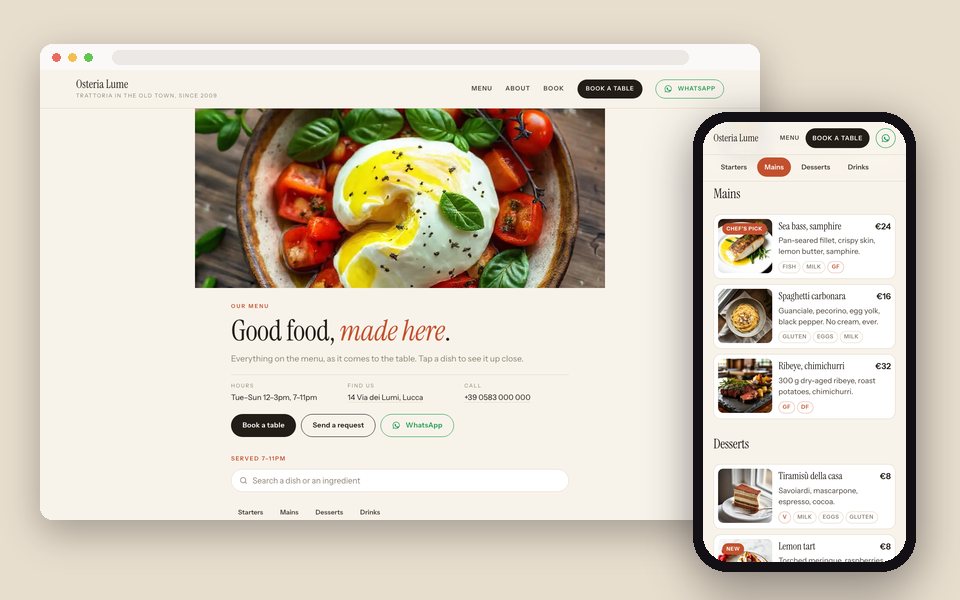
One Drive folder per menu (Food, Drinks, Lunch) with a subfolder per category becomes a gallery; give each dish a name, a description, a price and tags for allergens and diets in the gallery editor. Choose Restaurant menu and the Bistro design in Website, add your address, hours and booking link, publish, and print the QR code. Add a dish to the folder and it's on the menu; move it out and it's gone.
A menu guests scroll on their phone: every dish as a photo or a short video with its name, description, price and allergens; categories from your folders; a QR code for the tables.
Short clips uploaded to GalleryLink autoplay muted as guests scroll; tap a dish to see it large with sound. Photos work just as well.
Starters, Mains, Desserts from your subfolders, as chips that follow the scroll and jump to the section.
Set once per dish. Tags like Gluten, Nuts, V, VG and GF show as chips; 'new', 'sold out' and 'chef's pick' become badges.
Food, Drinks, Brunch, Christmas: each a gallery, each a tab; the first one is the home page.
Address with a map link, opening hours, phone, WhatsApp, and a 'Book a table' or 'Order' button in the header.
Download a print-ready QR code for the tables; put the menu at menu.yourrestaurant.com on Pro and Studio.
Food → Starters, Mains, Desserts. Drop in photos or 5–15 second vertical clips of each dish.
In the gallery editor: the dish name, a line of description, the price, and tags for allergens and diets.
In Dashboard → Website. Add your hours, address, phone and booking link; pick Cream, Night, Olive or Navy.
Download the QR code from the Publish step. Change a price in the editor, or swap a photo in the folder, and the menu updates.
Build and preview the site free, with no card. Publishing is part of Pro, $8/mo or $80/yr, with unlimited galleries, every design and theme, and your own domain. There is no charge per site, per page or per item.
See full pricing →Not from the page itself. The header button can go to your ordering or booking system, and the form takes table requests. For ordering and billing at the table, MenuLink, our sister app, is built for that.
Both show on the menu. Clips uploaded to GalleryLink (Studio) autoplay as guests scroll; clips in Drive play when a dish is tapped, because they stream through Google.
Add the tag 'sold out' to the dish in the gallery editor; it greys out with a badge. Remove the tag when it's back.
Write it in the language you serve in; a translation switch is on our list. The fixed words on the page are English for now.
Keep a Lunch folder and swap the photos each week, or keep a 'Specials' subfolder you empty and refill. The QR code never changes.
Paste a Google Drive folder, pick what the site is for and a design, and preview it with your own photos. Free to start, no credit card.
Start freeOpen the Website editor